Encryption & System Architecture
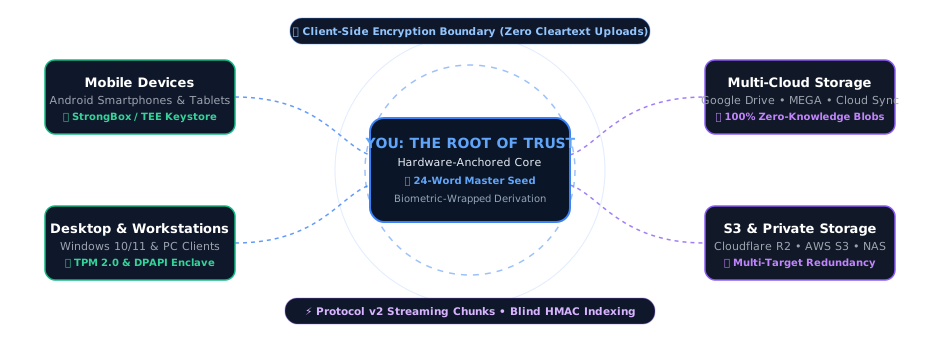
Sino protects your data flow from end to end with AegisStream authenticated chunked streaming, VolatileStream in-memory playback, QuantumShield post-quantum signed device list, BlindSight Indexing, and IronCore hardware-anchored roots of trust.
Sovereign Architecture & Sino OrbitMesh Topology
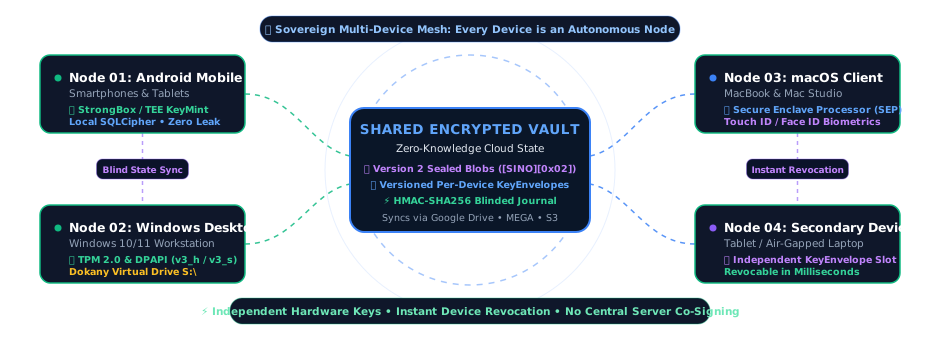
Sino operates as a zero-knowledge sovereign mesh called Sino OrbitMesh. There is no Sino server in the middle: each phone or PC with your vault is an independent node with its own keys, protected by its IronCore security chip, and the devices stay in step only through the encrypted files in your own clouds.
Multi-Platform Node Enclave Implementations
Every enrolled device functions as an independent sovereign node in the mesh. Each one protects its device secrets with the security chip of its operating system, and releases the vault key only to your password or your biometric.
Android Mobile Node
Utilizes the Android Keystore backed by StrongBox KeyMint or hardware Trusted Execution Environment (TEE) via IronCore Mobile. Biometric unlock uses a Keystore key that needs a strong (Class 3) biometric for every use and is invalidated when a new fingerprint or face is enrolled. The local databases are SQLCipher-encrypted, with field-level encryption on top.
Windows Desktop Node
Anchored to the PC's TPM 2.0, with DPAPI as fallback, each value sealed individually to its name, and unlocked with Windows Hello. Mounts the unlocked vault as a drive (the first free letter from S:) via Dokany v2, decrypting on demand in memory; Local Vault folders also accept new and edited files.
macOS Workstation Node
A future Compose Multiplatform workstation sharing :sino-core. Apple platforms are out of scope for the current release and deferred to a future cycle (see the roadmap).
Auxiliary & Companion Node
Secondary devices receive their own enrolled entry in the ML-DSA-65 signed device list. Each device possesses a local ML-KEM-768 keypair whose private seed never leaves it. When retired or lost, any active device can revoke its entry via the signed device list.
Blind State Sync via Obscura Tree
Devices exchange changes through one encrypted file list per folder (an AES-256-GCM metadata batch), stored under a salted HMAC-SHA256 name (Obscura Tree). Additions, renames and deletions are merged across devices and clouds. Cloud hosts see only opaque files, never folder names, file names or contents.
Per-Device Keys, No Vault Key in the List
Each node has its own ML-KEM-768 and ML-DSA-65 key pairs, from a seed that never leaves it. The signed device list stores each device's public keys, never a copy of the vault key, so a device always needs the password to open the vault. Each device's name and type are encrypted under a key derived from the vault, so the cloud sees only a random id.
Signed Device List Revocation
If a device is lost or decommissioned, an authorized device marks it as revoked on the ML-DSA-65 signed device list pinned by nodes. The revoked device wipes itself (Terminus Protocol) the next time it checks the list, locked or not. No keys are rotated and cloud files stay untouched, which also means revocation is a kill switch, not a lock-out: it cannot undo what the device already decrypted.
Key Derivation & AegisStream Protocol v2 Flow
The vault key is random and released only to you; device secrets are sealed by IronCore. Files are encrypted with AegisStream chunked authenticated encryption and viewed in memory through VolatileStream, without decrypted copies on disk.

1. Argon2id & IronCore Hardware
Your master password is stretched with RFC 9106 Argon2id (64 MiB, 3 iterations, 4 lanes) into a key-encryption key that exists only in memory. It unwraps the Root Master Key (RMK): 32 random bytes, never stored unwrapped, and wiped when Sino locks. Device secrets are sealed by IronCore (Android StrongBox/TEE, Windows TPM 2.0 or DPAPI).
2. Dual-Key Wrap & Biometric Derivation
The vault key is also wrapped by a biometric-gated key (an Android Keystore key in StrongBox/TEE, or a Windows Hello passkey), so daily unlocks skip the Argon2id wait; your password always works as a fallback.
3. AegisStream & VolatileStream
Each file gets a random 256-bit key, is split into 1 MiB chunks (1,048,576 B) and encrypted with unique counter nonces (BaseIV[0..7] || ChunkIdx) via AegisStream. Uploads go in resumable 8 MiB parts, each cloud at its own pace, and VolatileStream plays media from memory.
4. QuantumShield Device Keys
Each enrolled device has an ML-KEM-768 key pair (LatticeGate) and an ML-DSA-65 key pair. Optional wrong-password alerts between your devices are sealed to the LatticeGate keys and signed, so only your devices read them. No copy of the vault key in your clouds depends on public-key cryptography, which keeps it safe from 'Harvest Now, Decrypt Later' quantum attacks.
5. Signed Device List & Revocation
Vault state is coordinated via versioned metadata snapshots and a device list signed with ML-DSA-65 (NIST FIPS 204). When a device is revoked, it automatically wipes its local vault (Terminus Protocol) on its next check without touching cloud data.
6. Enrolment Without Re-encryption
A device joins by adding its public keys to the signed device list when it unlocks the vault. No file is re-encrypted or re-uploaded, however large the vault.
Recovery & Range Decryption Flow
Sino needs no server for recovery. Your new device downloads the encrypted recovery backup from your clouds and opens it with your IronSeed; every container is authenticated before it is used.

1. IronSeed Keystone & Salt Derivation
Your 24 words (from the BIP-39 word list) are stretched with Argon2id into a key that opens rmk_backup.bin, the encrypted copy of your Root Master Key and vault salt kept in every connected cloud. The phrase is never stored or uploaded, and no Sino server is involved.
2. Version 2 Container Integrity
Cloud metadata batches and recovery archives are packaged in Version 2 containers ([SINO][0x02][IV][CIPHERTEXT][SHA256]). AES-256-GCM authenticates the contents; the trailing SHA-256 tells storage damage apart from a wrong key or tampering.
3. VolatileStream Range Decryption
Sino's hardened VolatileStream decryptRange() subsystem maps a requested byte range to its 1 MiB chunks and decrypts only those, in memory, after checking each chunk's tag. Seeking in long videos and large PDFs needs no full download and leaves no decrypted copy on disk.
Metadata Protection & BlindSight Indexing (FLE)
Traditional cloud backups encrypt only the file payload, leaving file paths, folder structures, timestamps, and file sizes in clear text. This metadata leakage exposes relationships, habits, and private directory structures to cloud hosts and network eavesdroppers.
On your device, Sino combines whole-database encryption (SQLCipher 4 format) with BlindSight Indexing (Field-Level Encryption). Sensitive columns are encrypted again with probabilistic AES-256-GCM under a key labelled SINO/V1/DB-FIELD-ENC, and exact-match lookups use HMAC-SHA256 blind indexes (SINO/V1/DB-FIELD-INDEX), so those values are never stored in plain text.
Before synchronizing to the cloud, directory hierarchies and filenames are anonymized using Obscura Tree salted HMAC-SHA256 path obfuscation (32-character directory hashes, 32-character deterministic file blobs, and 16-character .batch metadata batches). File names, sizes, dates and keys travel only inside the encrypted file lists. Cloud providers see opaque names and encrypted data, so they cannot rebuild your folder tree, your paths or your file names.
AegisStream & OmniMirror Multi-Cloud Sandbox
Simulate how Sino splits a file into 1 MiB authenticated chunks with AegisStream, hides its name in an encrypted file list, and copies it to your OmniMirror clouds.
1MB Chunk Partition & GCM
1MB plaintext chunks + 16B tags encrypted with counter nonces.
Encrypted File List
The file gets a scrambled cloud name; its real name, size and key go into the folder's encrypted file list.
OmniMirror Storage Targets
Even if an attacker breaks into every one of your cloud accounts or intercepts your traffic, they get only scrambled names (Obscura Tree) and AES-256-GCM encrypted data (AegisStream). Without your vault key, which only your password, your fingerprint, face or Windows Hello, or your 24-word IronSeed can release, the stored data stays unreadable.
Model Context Protocol (MCP) Server
Connect external AI agents, autonomous security auditors, and developer environments (Claude Desktop, Cursor, Antigravity) directly to Sino's live technical knowledge base using the standard Model Context Protocol.
claude_desktop_config.json)
{
  "mcpServers": {
    "sino-docs": {
      "url": "https://ai.sinosecure.app/mcp"
    }
  }
}
Once configured, your AI assistant will automatically possess the search tool to query Sino's encryption schemas, Protocol v2 streaming algorithms, hardware Keystore bindings, and compliance requirements in real time.