Your Files.
Your Keys.
Your Cloud.
A sovereign privacy ecosystem centered around you, not the cloud. Sino locks your private files with your device’s built-in IronCore security processor before they ever touch cloud storage giving you exclusive control over your data without changing how you already work.
An Ecosystem Built Around You, Not the Cloud
Traditional cloud services make you orbit around their servers and rules. Sino flips the script with Sino OrbitMesh: your device is your personal command center, and your cloud accounts become secure storage lockers that answer only to you.
Renting a Storage Unit with Shared Keys
When you upload files directly to normal cloud storage, it’s like renting a storage locker and leaving a spare key with the front desk. They promise not to look inside, but they hold the master key, they can see the labels on your boxes, and they decide if you’re allowed in.
Your Personal Digital Safe
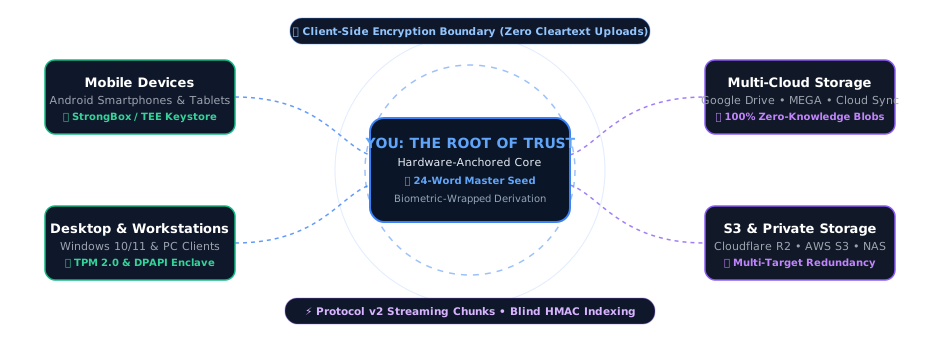
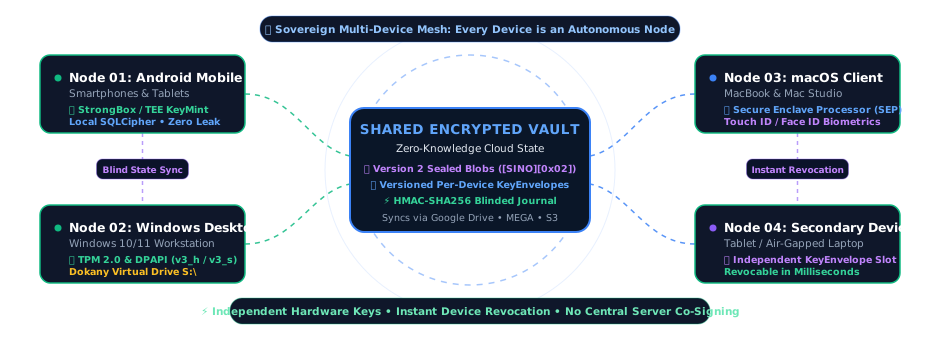
Sino puts a hardened digital safe inside your own phone or computer powered by IronCore silicon. You lock your private files inside the safe first using hardware enclaves. You can store that locked safe anywhere across OmniMirror cloud storage, but to the cloud company, it’s just scrambled mathematical noise under Obscura Tree directory masking.
How Sino Works
Your files are encrypted before they leave your device. Only encrypted data is stored in your cloud account.

Security Meets Convenience
Sino was built to bridge the gap between strong privacy and the convenience of everyday cloud storage. You don't need to be a cybersecurity expert to keep your data safe.
"Think of Sino like a personal lawyer who works entirely for you, under your absolute control."
Just as a lawyer protects your secrets under strict confidentiality, Sino acts as your digital advocate encrypting your files locally so that no third party, cloud provider, or government can inspect them without your permission.
Separation of Concerns
Most cloud providers are responsible for both storing and protecting your files. Sino introduces an independent privacy layer.
Your cloud provider continues to do what they do best: store your files, sync your data, and maintain 100% availability. Sino focuses solely on one thing: protecting the absolute confidentiality of the data itself by encrypting it locally before it ever leaves your device.
What Deserves Protection?
Cloud storage is simple and convenient, but some information is simply too personal or confidential to leave unencrypted:
Who is Sino For?
Tailored for how you work and live. Sino creates a sovereign privacy orbit around your digital life engineered for individuals protecting personal legacies and organizations safeguarding critical operations.
Professionals
Doctors, lawyers, accountants, and journalists who handle highly confidential client data daily.
Business Owners
Protecting proprietary research, business contracts, and financial records from data breaches.
Families & Parents
Securing digital birth certificates, property deeds, and important family archives for the future.
Everyday Users
Anyone who values their right to personal privacy but wants the convenience of their favorite cloud app.
Explore Protections by Profile
Select your profile to see how Sino's zero-knowledge orbit defends your specific workflows.
A Permanent Safe for Your Most Important Memories
Protect family photos, tax records, and recovery keys without subscription traps or prying eyes.
Invisible to Prying Eyes
Your photos, files, and even their folder names are scrambled before upload. Cloud hosts see only meaningless digital static.
Locked by Your Device Chip
Powered by the same physical security chip that protects your fingerprint or Face Unlock. Your keys never leave your device.
One 24-Word Recovery Key
No passwords stored on remote servers that can be hacked or reset. If you lose your phone, your 24 private words (IronSeed) restore everything instantly.
Use Storage You Already Own
Connect the free cloud accounts you already have. Sino turns them into a zero-knowledge private vault without extra monthly storage fees.
Hardware-Anchored Privacy for Your Company's Critical Work
Protect client confidentiality, financial data, and executive communications without vendor lock-in.
Zero-Knowledge Cloud Isolation
Even if your cloud storage host suffers a major security incident, your company's data remains client-side encrypted and unreadable. Cloud hosts never hold decryption keys.
Instant Team Device Control
Authorize or revoke team member access in seconds without having to download and re-upload terabytes of company archives.
Multi-Cloud Redundancy
Mirror encrypted archives across multiple cloud providers at once so your business is never at the mercy of one company's outages or price hikes.
Executive Enclave Isolation
Keep executive board decks, financial audits, and legal secrets protected from unauthorized internal staff or cloud hosts.
Why Sino? Engineered for Sovereignty
Sino combines zero-knowledge client-side encryption with native hardware acceleration, giving you uncompromising privacy without sacrificing daily speed.
Local-First AegisStream
Your files are encrypted on your physical device via AegisStream before they ever touch the network. All encryption and decryption happens on-the-fly in RAM, leaving zero unencrypted temporary files on disk.
Bring Your Own Cloud (OmniMirror)
Connect the cloud storage accounts you already use Google Drive, MEGA, or any S3-compatible provider. OmniMirror turns them into zero-knowledge synchronous arrays without requiring extra monthly storage fees.
VolatileStream 4K Playback
Watch encrypted 4K videos and browse high-res photos on-demand. VolatileStream range decryption processes only the specific seconds you are viewing directly in volatile RAM, eliminating full download wait times.
IronCore Silicon Enclave Speed
Enjoy instant cold-starts. Sino anchors cryptographic keys directly inside your device's IronCore silicon chip (Android StrongBox, Windows TPM 2.0, Apple SEP), bypassing slow key derivation on startup.
Virtual Drive Integration
Mount your vault directly to your OS (via Android Storage Access Framework). Browse, open, and edit encrypted files from third-party apps like VLC or office suites via secure memory pipes.
Restore Anywhere (IronSeed)
Your vault is never locked to one device or vendor. If your device is lost, damaged, or upgraded, enter your 24-word IronSeed on any compatible device to immediately restore full access.
Privacy Promise
“We built Sino so that we don't need to trust ourselves.”
We don't own your cloud storage
We don't see your files
We don't upload encryption keys
We don't analyse your documents
We don't train AI on your data
We don't sell your information
We don't use advertising
We don't collect telemetry or track you
The Sino Promise
We cannot read your files. We cannot reset your password. We cannot see your names. You are in total control of your digital legacy.
Zero-Knowledge Hardware Vault
Simulate our live AegisStream Protocol v2 streaming, Version 2 container sealing, and OmniMirror multi-cloud sync below, or click the arrow button to view the technical architecture blueprint.
1MB Chunk Partition & GCM
1MB plaintext chunks + 16B tags encrypted with counter nonces.
Version 2 Binary Seal
Sealed in [SINO][0x02] binary containers with trailing SHA-256 integrity.
OmniMirror Storage Targets
Even if an attacker compromises all multi-cloud storage accounts or intercepts network traffic, they receive only blind HMAC hashes under Obscura Tree and 100% zero-knowledge AegisStream AES-256-GCM packets. Without your local IronCore hardware-anchored Root Master Key (StrongBox / TPM 2.0) and Argon2id / IronSeed credentials, the stored data remains unreadable mathematical entropy.

IronCore Key Anchoring
Root keys are non-exportably anchored inside IronCore silicon security chips (Android StrongBox KeyMint/TEE and Windows TPM 2.0 v3_h: / DPAPI v3_s:).
AegisStream Chunked GCM Streaming
Files stream via AegisStream through zero-disk RAM buffers into 1MB plaintext chunks (1,048,576 B) with unique counter nonces (BaseIV || ChunkIdx) and 16B tags.
BlindSight Indexing + SQLCipher FLE
Database rows are protected by SQLCipher (AES-256-CBC) while sensitive columns are individually encrypted (Database_Encryption_V1) with BlindSight Indexing blind HMAC search.
Version 2 Binary Sealed Containers
All cloud sync payloads and recovery archives use Version 2 binary containers ([SINO][0x02]) with trailing whole-stream SHA-256 checksums.
VolatileStream RAM Range Decryption
Instant seek and streaming in 4K media and PDFs via on-the-fly 1MB VolatileStream range calculation (decryptRange) streamed in volatile RAM buffers to minimize cleartext disk persistence.
Elite Security Features
VolatileStream RAM-Only Viewer
View images and stream 4K videos directly within the app via VolatileStream. Files decrypt strictly into volatile RAM buffers with immediate zeroization, minimizing cleartext footprint on physical storage.
Terminus Protocol & Panic Lockdown
A 1x1 Home Screen widget to trigger instant lockdown (`forceLock()`) and Terminus Protocol emergency shredding. Instantly purges active encryption keys and sanitizes memory arrays in < 800ms.
Stealth Disguise Mode
Disguise Sino as a fully functioning "Calculator" or "Weather" app. Custom launcher icons hide your secure vault from visual inspection.
PhantomVault Duress Safe
Enter a secondary Duress Password to unlock a fully functional PhantomVault decoy safe. Perfect for situations where you are forced to unlock the device under physical coercion.
Dead Man's Switch
Set up digital legacy handovers. Automatically triggers peer-encrypted key share protocols if the app is not unlocked for a set duration.
BlindSight Indexing & FTS4 Search
Search your encrypted media instantly using BlindSight Indexing and local FTS4 indexes. Toggle 'Stats for Nerds' to monitor real-time hardware performance overlays.
IronCore Biometric Bridge
Hardware-wrapped DB keys inside IronCore silicon bypass slow Argon2 delays on biometric unlocks, allowing instant UI loads without sacrificing passphrase security.
OmniMirror Multi-Cloud Engine
Sync across Google Drive, MEGA (with SRP-6a authentication), and S3 object storage in parallel via OmniMirror synchronous array.
Background Sync
Powered by Android WorkManager with Wi-Fi and charging constraints. Periodic heartbeats guarantee 100% database synchronization.
QuantumShield Suite (PQC v1)
ML-KEM-768 key encapsulation (NIST FIPS 203) and ML-DSA signatures (NIST FIPS 204) shield vault envelopes from future quantum decryption.
LatticeGate & InstantSever
Versioned per-device LatticeGate KeyEnvelope architecture allows instant device revocation via InstantSever in milliseconds without requiring full cloud re-encryption.
Regulatory Standards
Architectural technical safeguards supporting GDPR (Art. 25 & 17), HIPAA Conduit Exception, APP, and NIST SP 800-88 Cryptographic Erase.
Supported Storage Providers
Sino is a multi-cloud synchronization application designed to help you securely back up and manage your files directly to Google Drive, MEGA, or any S3-compatible object storage. You retain full ownership of your storage and your keys.
Google Drive Integration
The app uses Google Drive to provide users with a seamless way to store their encrypted backups and access their documents on the go.
API Scope Access: Utilizes drive.file (access restricted to the app-created SinoVault folder) and drive.appdata (secure settings synchronization).
Zero-Knowledge: All files are encrypted on your Android or Windows device using AES-256-GCM keys anchored in the hardware keystore before they are transmitted to Google Drive.
Learn more in our official Privacy Policy.
MEGA Cryptographic Sync
Sino integrates directly with MEGA storage to provide secondary redundant synchronization layers without trusting third-party storage nodes.
SRP-6a Protocol: Authenticates securely with MEGA servers using client-side secure remote password protocols, ensuring your master login password is never exposed.
Fully Encrypted Blobs: Sino structures directory hierarchies as randomized database entries, preventing metadata leaks at the storage provider level.
Verify protocol details in our Security Model.
S3 Compatible Storage
Sino connects to any standard S3-compatible provider, including Amazon AWS S3, Cloudflare R2, and Backblaze B2, giving you absolute cloud independence.
Access Key Auth: Authenticates directly with buckets using AWS Signature Version 4 protocol, keeping access credentials fully hardware-encrypted at rest on your device.
Idempotent Sync: Features resumable multi-part upload workers, allowing interrupted large transfers to resume from the last successful block to protect battery cycles.
Verify protocol details in our Security Model.
The Cloud Hub & OmniMirror Multi-Cloud RAID
Sino treats cloud storage as an OmniMirror Redundant Array of Independent Disks (RAID). Mirror your encrypted files across Google Drive, MEGA, and multiple S3 endpoints to ensure immortal recovery.
The Delegating Cloud Hub
Manage your entire multi-cloud estate from a single unified console. Sino features a real-time delegating orchestrator that performs synchronous health audits to keep your active storage targets connected and fully isolated.
Aggregated Quota View
View your unified cloud storage capacity. Sino totals up available storage metrics across all connected targets as a single virtual disk.
Lead Target Routing
Choose your primary "Lead Disk" for active file transfers, while secondary cloud accounts act as silent background RAID mirrors.
Multi-Identity Isolation
Store independent provider credentials (emails) inside secure hardware slots, allowing you to connect different accounts simultaneously without collisions.
OmniMirror Cloud RAID Redundancy
Don't put all your data in one cloud. Sino replicates your encrypted blobs in parallel to give you maximum redundancy and fail-safe recovery.
Synchronous OmniMirror RAID 1: All critical security metadata (master recovery keys, folder salts, and legacy handovers) are mirrored simultaneously to make your access keys indestructible.
RAID-Aware Storage Cleanup: Free up local device storage safely. Sino's deep audit engine guarantees a local file is only deleted if it has achieved verified redundancy on every active cloud provider in your array.
S3 RAID Registry: Connect multiple S3 endpoints (Amazon Web Services, Backblaze B2, Cloudflare R2) in parallel to establish enterprise-grade redundancy.
Documentation & Manuals
Interactive User Manual
Step-by-step setup guides, device pairing, and backup setup instructions.
Security Overview
Deep dive into key parameters, threats, and client security features.
Security Whitepaper (PDF)
Mathematical models, cryptographic proofs, and protocol details.
Encryption Architecture
Visual mapping of keys, files, databases, and sync protocols.
Recovery Guide (PDF)
How to restore data when you lose access to your primary device.
Changelog & Release Notes
View features, optimizations, and security patches for each version.
Auditing Regulatory & Privacy Compliance?
Inspect our 20 technical compliance mappings across GDPR, NDPA, SOC 2 Type II, FedRAMP, PCI-DSS v4.0, CJIS, NIST CSF 2.0, CIS Controls, HIPAA, and ISO/IEC 27001.
Ready to Take Control of Your Files?
Start taking control of your digital legacy and privacy today. Download Sino and begin encrypting your files with zero-trust security.
Distributed officially via the Google Play Store and Microsoft Store.