Your Files.
Your Keys.
Your Cloud.
Sino is a private vault for your phone and PC. It encrypts your photos, videos and documents on your own device, then backs them up to the cloud accounts you already have. Your cloud stores them, but only you can open them.
New to Sino? Set it up in five minutes · See how it compares
An Ecosystem Built Around You, Not the Cloud
Traditional cloud services make you orbit around their servers and rules. Sino flips the script with Sino OrbitMesh: your device is your personal command center, and your cloud accounts become secure storage lockers that answer only to you.
Renting a Storage Unit with Shared Keys
When you upload files directly to normal cloud storage, it’s like renting a storage locker and leaving a spare key with the front desk. They promise not to look inside, but they hold the master key, they can see the labels on your boxes, and they decide if you’re allowed in.
Your Personal Digital Safe
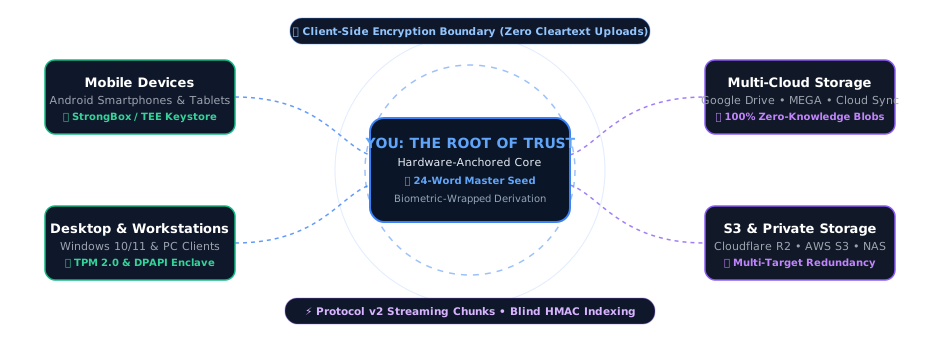
Sino puts a digital safe inside your own phone or computer. Your files are locked inside it first, on your device, and only then copied to your cloud accounts. To the cloud company, every file, file name and folder name is scrambled data it cannot read.
How Sino Works
Your files are encrypted before they leave your device. Only encrypted data is stored in your cloud account.

Choose what to protect
Pick folders to back up, like your Camera or Downloads, or move files straight into Sino's private Local Vault.
Sino encrypts on your device
Each file is locked with its own key before it leaves your phone or PC. Names and folders are scrambled too.
Copies go to your clouds
Google Drive, MEGA or any S3 storage: one or several at once, so one provider failing never costs you your files.
Open them anywhere
View files in Sino on your phone or PC. Lost your device? Your 24-word recovery phrase brings your vault back on a new one.
Security Meets Convenience
Sino was built to bridge the gap between strong privacy and the convenience of everyday cloud storage. You don't need to be a cybersecurity expert to keep your data safe.
"Think of Sino like a personal lawyer who works entirely for you, under your absolute control."
Just as a lawyer protects your secrets under strict confidentiality, Sino acts as your digital advocate encrypting your files locally so that no third party, cloud provider, or government can inspect them without your permission.
Separation of Concerns
Most cloud providers are responsible for both storing and protecting your files. Sino introduces an independent privacy layer.
Your cloud provider continues to do what they do best: store your files, sync your data, and maintain 100% availability. Sino focuses solely on one thing: protecting the absolute confidentiality of the data itself by encrypting it locally before it ever leaves your device.
What Deserves Protection?
Cloud storage is simple and convenient, but some information is simply too personal or confidential to leave unencrypted:
Who is Sino For?
Tailored for how you work and live. Sino creates a sovereign privacy orbit around your digital life engineered for individuals protecting personal legacies and organizations safeguarding critical operations.
Professionals
Doctors, lawyers, accountants, and journalists who handle highly confidential client data daily.
Business Owners
Protecting proprietary research, business contracts, and financial records from data breaches.
Families & Parents
Securing digital birth certificates, property deeds, and important family archives for the future.
Everyday Users
Anyone who values their right to personal privacy but wants the convenience of their favorite cloud app.
Explore Protections by Profile
Select your profile to see how Sino's zero-knowledge orbit defends your specific workflows.
A Permanent Safe for Your Most Important Memories
Protect family photos, tax records, and recovery keys without subscription traps or prying eyes.
Invisible to Prying Eyes
Your photos, files, and even their folder names are scrambled before upload. Cloud hosts see only meaningless digital static.
Locked by Your Device Chip
Your vault opens only with your password or your fingerprint or face, using the same security chip that protects them. Your cloud never gets a key that opens your files.
One 24-Word Recovery Key
No password stored on a server that can be hacked or reset. If you lose your phone, your 24 private words (IronSeed) bring your whole vault back on a new one.
Use Storage You Already Own
Connect the free cloud accounts you already have. Sino turns them into a zero-knowledge private vault without extra monthly storage fees.
Hardware-Anchored Privacy for Your Company's Critical Work
Protect client confidentiality, financial data, and executive communications without vendor lock-in.
Zero-Knowledge Cloud Isolation
Even if your cloud storage host suffers a major security incident, your company's data remains client-side encrypted and unreadable. Cloud hosts never hold decryption keys.
Instant Team Device Control
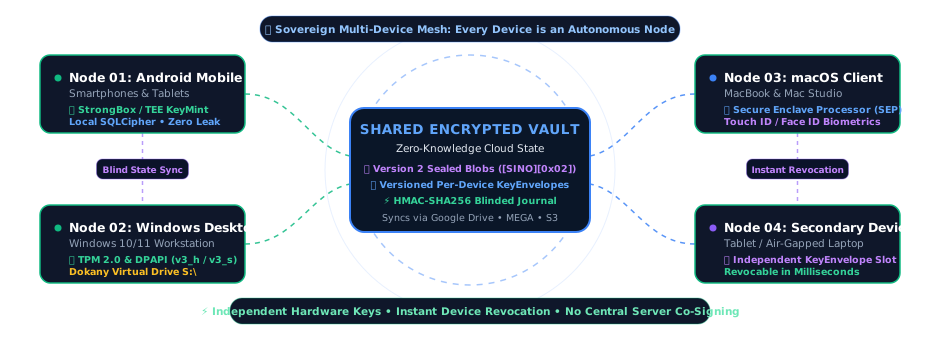
Lost a laptop or phone? Revoke it from any other device, and it erases Sino from itself the next time it connects. Nothing needs to be re-uploaded.
Multi-Cloud Redundancy
Mirror encrypted archives across multiple cloud providers at once so your business is never at the mercy of one company's outages or price hikes.
Executive Enclave Isolation
Keep executive board decks, financial audits, and legal secrets protected from unauthorized internal staff or cloud hosts.
Why Sino? Engineered for Sovereignty
Sino combines zero-knowledge client-side encryption with native hardware acceleration, giving you uncompromising privacy without sacrificing daily speed.
Local-First AegisStream
Your files are encrypted on your own device before they touch the network, each with its own key. Viewing them decrypts into memory only, so no unlocked copy is left behind on disk.
Bring Your Own Cloud (OmniMirror)
Connect the cloud accounts you already use: Google Drive, MEGA or any S3-compatible storage. OmniMirror keeps encrypted copies on one or several of them, with no extra storage subscription from us.
VolatileStream 4K Playback
Watch encrypted videos and browse photos straight from your vault. VolatileStream decrypts only the part you are watching, in memory, so you never wait for a full download.
Your Private Local Vault
Move files into Sino and they disappear from your gallery and file manager, kept encrypted where other apps cannot reach them. Keep each folder on this device only, or back it up to the clouds you pick.
Virtual Drive Integration
Your unlocked vault shows up in the Android Files app or as a Windows drive. Open files in your usual apps, and save new or edited files into Local Vault folders, where Sino encrypts them.
Restore Anywhere (IronSeed)
Your vault is never tied to one device or one cloud. If your device is lost, broken or replaced, enter your 24-word IronSeed on a new phone or PC to get your vault back.
Privacy Promise
“We built Sino so that we don't need to trust ourselves.”
We don't own your cloud storage
We don't see your files
We don't upload encryption keys
We don't analyse your documents
We don't train AI on your data
We don't sell your information
We don't use advertising
We don't collect telemetry or track you
The Sino Promise
We cannot read your files. We cannot reset your password. We cannot see your names. You are in total control of your digital legacy.
Zero-Knowledge Hardware Vault
Simulate our live AegisStream Protocol v2 streaming, Version 2 container sealing, and OmniMirror multi-cloud sync below, or click the arrow button to view the technical architecture blueprint.
1MB Chunk Partition & GCM
1MB plaintext chunks + 16B tags encrypted with counter nonces.
Encrypted File List
The file gets a scrambled cloud name; its real name, size and key go into the folder's encrypted file list.
OmniMirror Storage Targets
Even if an attacker breaks into every one of your cloud accounts or intercepts your traffic, they get only scrambled names (Obscura Tree) and AES-256-GCM encrypted data (AegisStream). Without your vault key, which only your password, your fingerprint, face or Windows Hello, or your 24-word IronSeed can release, the stored data stays unreadable.

IronCore Key Anchoring
The vault key opens only with your master password (Argon2id) or a biometric-gated hardware key (Android Keystore StrongBox/TEE, Windows Hello), and is wiped from memory on lock. Device secrets are sealed by the Keystore or the Windows TPM 2.0 (DPAPI as fallback).
AegisStream Chunked GCM Streaming
Each file has its own random 256-bit key and is encrypted in 1 MiB chunks (1,048,576 B), each with a unique counter nonce (BaseIV || ChunkIdx) and a 16 B tag.
BlindSight Indexing + SQLCipher FLE
The local database is encrypted whole (SQLCipher 4 format), and sensitive columns are encrypted again with AES-256-GCM (SINO/V1/DB-FIELD-ENC), searchable through BlindSight HMAC blind indexes.
Version 2 Binary Sealed Containers
Folder file lists, snapshots, settings and the recovery backup are sealed in Version 2 containers ([SINO][0x02]): AES-256-GCM, plus a trailing SHA-256 that tells storage damage apart from tampering.
VolatileStream RAM Range Decryption
Seeking in videos and documents decrypts only the 1 MiB chunks needed (decryptRange), each checked before use, into memory buffers that are wiped afterwards.
Elite Security Features
VolatileStream RAM-Only Viewer
View photos, play videos and read documents inside Sino. Files are decrypted into memory only and wiped when you close them, never saved as an unlocked copy.
Terminus Protocol & Panic Wipe
An emergency 1x1 Home Screen widget to trigger the Terminus Protocol immediately. Purges active keys from memory, destroys hardware-backed keys so ciphertext cannot be decrypted, and deletes local vault databases (cloud backups are not touched).
Stealth Disguise Mode
Disguise Sino as a Calculator: on Android, its icon and name change; on Windows, it opens as a working calculator that unlocks only with your secret code.
PhantomVault Duress Safe
A second password opens a separate, fully working decoy vault. If someone forces you to unlock Sino, they see the decoy, and nothing shows a real vault exists.
Dead Man's Switch
Name trusted people who can claim your vault if you stop using Sino for 30 to 180 days, or hand it over whenever you choose. Sealed in advance, so only their device can open it.
Private Search (BlindSight)
Search your whole library instantly. Search runs entirely on your device, inside its encrypted database; nothing about it is ever sent to a cloud.
IronCore Biometric Security
Unlock with your fingerprint, face or Windows Hello. The key behind it lives in your device's security chip and works only after you are verified. Sino locks itself when you stop using it.
OmniMirror Multi-Cloud Engine
Back up to Google Drive, MEGA and S3-compatible storage at the same time, choosing which clouds each folder goes to.
Background Sync
New photos and files back up on their own in the background. Choose Wi-Fi only or charging only to save your data plan and battery.
QuantumShield Suite (PQC v1)
Built with the new NIST post-quantum standards (ML-KEM-768, FIPS 203 and ML-DSA-65, FIPS 204), so data recorded today stays safe from future quantum computers.
QuantumShield & Device Revocation
See every device that has opened your vault. Revoke a lost one and it wipes Sino from itself the next time it connects, even while locked.
Regulatory Standards
Technical safeguards that can support GDPR (Art. 25 & 32), HIPAA encryption safeguards, the Australian Privacy Principles and NIST SP 800-88 Cryptographic Erase.
Supported Storage Providers
Sino is a multi-cloud synchronization application designed to help you securely back up and manage your files directly to Google Drive, MEGA, or any S3-compatible object storage. You retain full ownership of your storage and your keys.
Google Drive Integration
The app uses Google Drive to provide users with a seamless way to store their encrypted backups and access their documents on the go.
Minimal Access: Sino asks for one narrow permission: either Drive's hidden app folder (drive.appdata), or, in Visible mode, only the SinoVault folder it creates (drive.file). It cannot see your other files.
Zero-Knowledge: Every file is encrypted with AES-256-GCM on your Android or Windows device before it is sent to Google Drive.
Learn more in our official Privacy Policy.
MEGA Cryptographic Sync
Sino connects directly to your MEGA account, as your main cloud or as an extra copy alongside your others.
Password Never Sent: Sino uses MEGA's own client-side login: your MEGA password is processed on your device and never sent to MEGA. Two-factor codes are supported, and Strict 2FA mode never stores the seed.
Fully Encrypted Blobs: Files, file names and folder names are encrypted or hashed before upload, so MEGA sees no names and no folder structure.
Verify protocol details in our Security Model.
S3 Compatible Storage
Sino connects to any standard S3-compatible provider, including Amazon AWS S3, Cloudflare R2, and Backblaze B2, giving you absolute cloud independence.
Access Key Auth: Authenticates directly with buckets using AWS Signature Version 4 protocol, keeping access credentials fully hardware-encrypted at rest on your device.
Idempotent Sync: Large uploads go up in 5 MiB parts, so an interrupted transfer resumes from the last finished part instead of starting over.
Verify protocol details in our Security Model.
The Cloud Hub & OmniMirror Multi-Cloud RAID
Sino treats your clouds like the disks of a RAID array: the same encrypted files can live on Google Drive, MEGA and several S3 buckets at once, so losing one provider never means losing your files.
The Delegating Cloud Hub
Connect, check and manage all your cloud accounts from one screen. Sino shows which clouds hold a copy of each file and repairs copies that go missing.
Aggregated Quota View
See the space used on every connected cloud. Because each file goes to every cloud chosen for its folder, the space for new files is set by the fullest one.
Per-Folder Cloud Choice
Send each folder to the clouds you pick, or leave it on all of them. The vault's security files always go to every connected cloud.
Multi-Identity Isolation
Use a different account for each provider. Every login is stored encrypted on your device and kept separate from the others.
OmniMirror Cloud RAID Redundancy
Don't put all your data in one cloud. Sino replicates your encrypted blobs in parallel to give you maximum redundancy and fail-safe recovery.
OmniMirror Redundancy: All critical security metadata (recovery backup, recovery salt, and signed device list) are mirrored to every connected cloud provider for resilient recovery.
RAID-Aware Storage Cleanup: Free up space on your device safely. Sino deletes a local file only once every cloud chosen for its folder holds a verified copy.
S3 RAID Registry: Connect multiple S3 endpoints (Amazon Web Services, Backblaze B2, Cloudflare R2) in parallel to establish enterprise-grade redundancy.
Documentation & Manuals
Interactive User Manual
Step-by-step setup guides, device pairing, and backup setup instructions.
Security Overview
Deep dive into key parameters, threats, and client security features.
Security Whitepaper (PDF)
Mathematical models, cryptographic proofs, and protocol details.
Encryption Architecture
Visual mapping of keys, files, databases, and sync protocols.
Recovery Guide (PDF)
How to restore data when you lose access to your primary device.
Changelog & Release Notes
View features, optimizations, and security patches for each version.
Auditing Regulatory & Privacy Compliance?
Inspect our 20 technical compliance mappings across GDPR, NDPA, SOC 2 Type II, FedRAMP, PCI-DSS v4.0, CJIS, NIST CSF 2.0, CIS Controls, HIPAA, and ISO/IEC 27001.
Ready to Take Control of Your Files?
Start taking control of your digital legacy and privacy today. Download Sino and begin encrypting your files with zero-trust security.
Distributed officially via the Google Play Store and Microsoft Store.